

The story behind the planner.
Click below to get organized and clear on your project using the Home Clarity Planner for only $47.99.
You’ll get instant digital access to both a sample-data version, so you can see exactly how to use it, and a clean version ready for your own project.
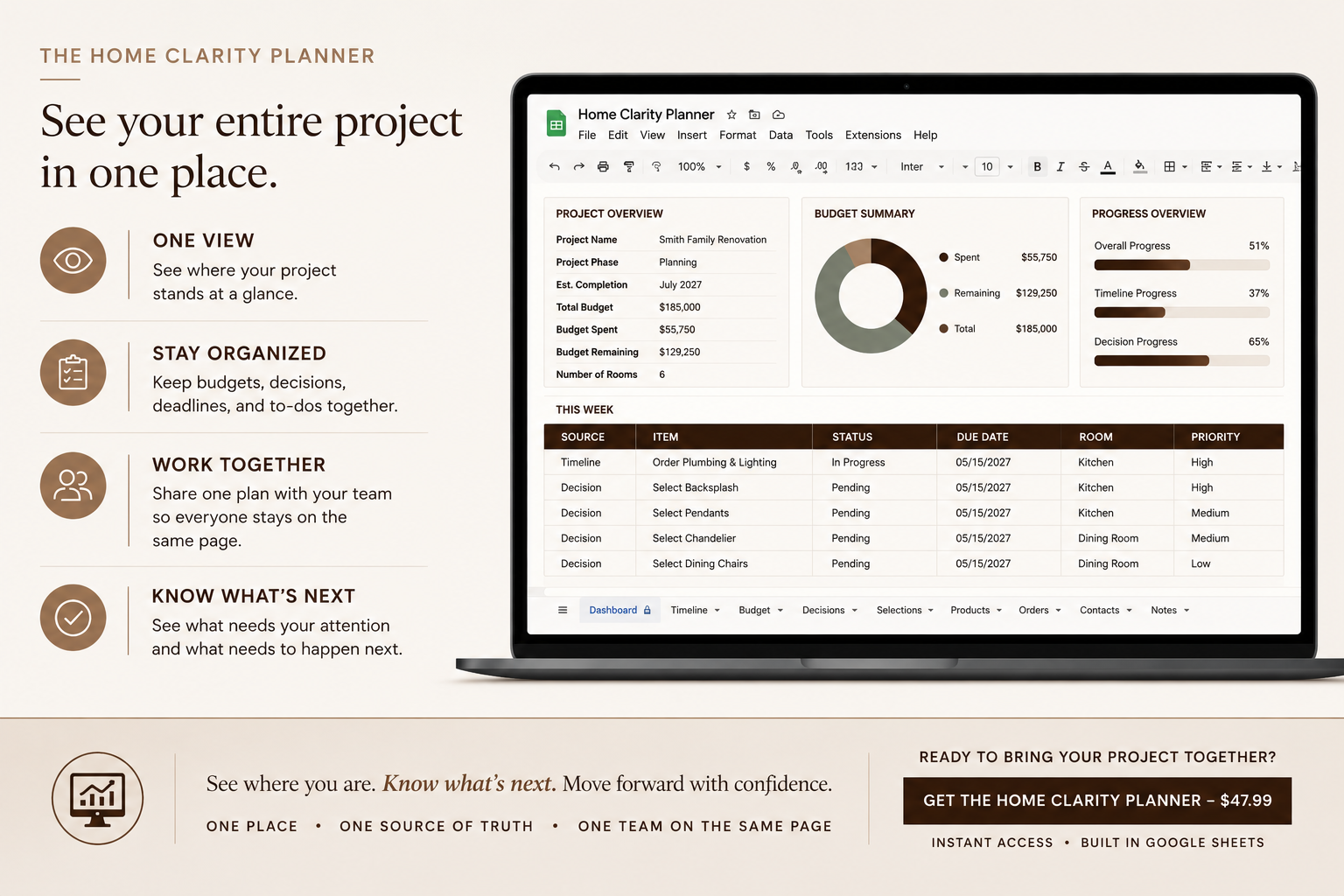
If your home project looks a little like this, you’re in the right place.
IS THE HOME CLARITY PLANNER FOR YOU?
This is for you if...
✓ You’re building a new home or renovating your current one, and you’re actively involved in the details.
✓ Your project information is scattered across Pinterest, texts, emails, screenshots, notes, spreadsheets, and conversations.
✓ You’re constantly making selections, placing orders, answering questions, and keeping track of what still needs to be decided.
✓ You want to know where your budget actually stands before the next invoice or change catches you off guard.
✓ You want one place to see what’s been decided, what’s been ordered, what’s coming up, and what still needs your attention.
✓ You want to walk into conversations with your builder, contractor, or designer knowing exactly where things stand.
This may not be for you if...
× You want someone else to completely manage the details of your project for you.
× You don’t want to maintain or update your project information as your build or renovation progresses.
× You’re looking for a tool that chooses finishes, makes design decisions, or manages construction for you.
This isn’t another renovation checklist.
Your selections, spending, orders, deadlines, and decisions don’t need to live in five different places.
Bring the details of your build or renovation together, so you can spend less time searching, second-guessing,
and figuring out what you missed, and more time knowing exactly what comes next.
One project. One organized place. A whole lot less to keep track of.
Instant digital access • Google Sheets required
Frequently Asked Questions
-
No. The Home Clarity Planner is a digital planner that works in Google Sheets. Nothing will be shipped to you. You will get the link to the planner once you complete payment.
-
Immediately after purchase, you'll receive instant access to download both the Sample Planner and the Blank Planner. Simply make a copy of the Blank Planner to your own Google Drive and start planning. Instructions are also included on the last tab of the planner.
-
No. The Home Clarity Planner is designed exclusively for Google Sheets.
A free Google account is all you need.
-
Your purchase includes:
• Home Clarity Planner (Blank Version)
• Completed Sample Planner
• Quick Start Guide
• Free lifetime updates to the planner
-
Yes.
As the planner improves, you'll receive free updates so you always have the latest version.
-
It's much more than that.
The Home Clarity Planner helps you organize your budget, selections, product links, decisions, timelines, conversations, documents, and project information—all in one place.
-
Because your renovation information belongs to you.
Unlike many apps that lock your data behind subscriptions, the Home Clarity Planner lives in your own Google Drive. It's fast, easy to customize, simple to share with your team, and you'll always have access to your project information whenever you need it.
-
Yes.
Instead of juggling Pinterest boards, screenshots, emails, notes, and spreadsheets, you'll have one organized place for everything. The Home Clarity Planner helps you stay on top of decisions, track progress, collaborate with your team, and confidently move your project forward.
-
Absolutely.
The planner is designed to be simple and intuitive, and you'll receive a Quick Start Guide that walks you through exactly how to get started.
-
Yes.
Whether you're renovating one room, remodeling your entire home, or building from the ground up, the planner is designed to organize every stage of your project.
-
Yes.
Simply make a copy of the Blank Planner for each new project. Your original file always stays untouched.
-
Yes.
Google Sheets makes collaboration easy. Share your planner with your contractor, architect, designer, or spouse and choose whether they can edit or view the document.
-
Yes.
You can access your planner from any device using Google Sheets, including your computer, tablet, or smartphone. For the best experience, we recommend using a desktop or laptop when setting up and organizing your project.
-
Because this is a digital product with instant access, all sales are final. If you experience any technical issues accessing your planner, please contact us and we'll make sure everything is working properly.
-
We're happy to help.
Email support@rowanandmuse.com and we'll get back to you as soon as possible.
-
Absolutely.
The Home Clarity Planner is fully customizable. Add or remove tabs, create your own categories, adjust dropdowns, insert additional rows, change colors, and tailor the planner to fit your project and workflow.
Whether you're planning a kitchen renovation, building a custom home, or managing multiple projects, you can make the planner work the way you do.
We recommend making a copy of the original planner before making major changes so you always have a clean version to reference.
-
Yes.
Whether you're managing the project yourself or working with an architect, designer, contractor, or builder, the planner keeps everyone on the same page by organizing decisions, documents, budgets, and timelines in one central place.